agent-downloader
No window. No popups. Nobody asking you where to save it. 没有窗口。不弹提示框。不会问你存哪。
You type one command and read one JSON object. That is the whole interface — for you and for an agent. 敲一条命令,读一个 JSON。这就是全部界面——对你、对 agent 都是。
19 commands · 23 MCP tools · 29 tests · exit 0/1/2/130 · Windows 10/11 19 个命令 · 23 个 MCP 工具 · 29 个测试 · 退出码 0/1/2/130 · Windows 10/11
$ dl "https://www.bilibili.com/video/BV1xx411c7mD"
{
  "ok": true, "status": "ok", "action": "download",
  "done_count": 1, "failed_count": 0,
  "downloaded": [{
    "filepath":   "D:\\downloads\\标题Title.mp4",
    "audio_file": "D:\\downloads\\标题Title.m4a"
  }],
  "notes": [], "elapsed_sec": 12.4
}
Overview概览
An agent can't click. It types a command and reads stdout. So the whole thing is built around one rule: stdout carries exactly one JSON object and nothing else. Progress, logs and warnings go to stderr, so whatever comes out of the pipe can always be json.loads'd.
agent 不会点鼠标。它敲命令、读 stdout。所以整件事只有一条规矩:stdout 里只有一个 JSON,别的一律滚去 stderr。进度、日志、警告都在 stderr,从管道里出来的东西永远能直接 json.loads。
I wrote it for myself first. Downloading a video normally gives you two things you want — the video and its audio track — so it hands you both, same folder, same name. Then it grew a pile of local media commands, because I got tired of typing ffmpeg by hand. 先是我自己在用。下个视频通常想要两样东西:视频和它的音轨。所以它一次给两份,同目录同名。后来长出一堆本地加工命令,因为我实在不想再手敲 ffmpeg 了。
Two files by default默认给两份
dl "<url>" leaves a video and a same-name .m4a next to it. Video only: --no-also-audio. mp3 instead of a copy: --also-audio=mp3.
dl "<链接>" 会留下一个视频和同名的 .m4a。只要视频:--no-also-audio。音轨要转 mp3:--also-audio=mp3。
It won't eat your files不会吃掉你的文件
Writes a temp name in the same folder, then renames. Never overwrites the original. --dry-run on nearly everything. Cleanup reports first and deletes only when told.
先写同目录的临时名,再原子改名,绝不覆盖原文件。几乎每个命令都有 --dry-run。清理默认只报告,要删得明说。
The contract契约
These are the parts an agent is allowed to depend on. Everything else is an implementation detail. 这些是 agent 可以依赖的部分,其余都是实现细节。
stdout | exactly one JSON object恰好一个 JSON 对象 |
stderr | progress, logs, warnings — never touches the data stream进度、日志、警告,不污染数据流 |
| exit codes退出码 | 0 all ok全成 ·
1 partial部分成 ·
2 all failed or bad args全败或参数错 ·
130 interrupted被打断 |
| envelope信封 | ok status action done_count failed_count done[] failed[] notes[] tool_versions elapsed_sec |
| streaming流式 | --ndjson — one JSON line per finished link, then a summary line每下完一个链接吐一行 JSON,最后一行是汇总 |
| paths产物路径 | downloads: 下载:downloaded[].filepath / audio_file · processing: 加工:done[].output |
| failures失败原因 | failed[].error — plain language, safe to show a human中文说明,可以直接给人看 |
| version版本 | dl version — build, command count, environment版本、命令数、运行环境 |
| discovery自我描述 | dl schema — every command, flag, JSON key, example全部命令、参数、JSON 键、例子 |
| defaults默认值 | dl config set out_dir|quality|also_audio|sound|progress_ui|cookies |
Exceptions never escape as tracebacks — they become failed[].error plus an exit code. And 130 isn't aspirational: the test attaches to the child console, fires a real CTRL_C_EVENT mid-download, then checks the half-written .part got removed.
异常不会变成 traceback 逃出来,它变成 failed[].error 加一个退出码。130 也不是"设计上支持":测试会附到子进程控制台、在下载中途发一次真的 CTRL_C_EVENT,再检查半成品 .part 有没有被清掉。
Commands命令
dl help for people, dl schema for programs. Same table behind both, so they can't disagree.
dl help 给人看,dl schema 给程序看。后面是同一张表,对不上是不可能的。
dl "<url>"# 下个视频,音轨也要# grab a video and its audio
dl --no-also-audio# 只要视频# video only
dl --also-audio=mp3# 音轨转 mp3# re-encode the audio
dl --from-file 清单.txtlist.txt# 批量;失败项可原样重跑# batch; failures re-runnable
dl --from-file list.txt --ndjson# 每下完一个链接吐一行 JSON# one JSON line per finished link
dl -q 1080 -o D:\dir# 清晰度上限、输出目录# quality cap, output dir
dl "<url>" --dry-run# 只看元数据# metadata only
cut "D:\videos"# 一整个文件夹抽音频(会递归)# audio out of a folder (recurses)
cut "<视频video>" mp3# 抽音频,指定格式重编码# extract audio, re-encode to mp3
fix "<文件file>"# 发微信打不开就转这个# WeChat won't open it → convert
shrink "<文件file>" --target-mb 25# 太大发不出去(够小就跳过)# too big to send (skips if small enough)
trim "<文件file>" 00:30-01:20# 只要中间那一段# just this bit
join a.mp4 b.mp4# 合并# merge
shot "<文件file>" --count 3# 抽帧# frames
gif "<文件file>" 00:10-00:14# 动图# animated gif
mute "<文件file>"# 去音轨# drop the audio track
mux clip.mp4 subs.srt# 塞字幕(软字幕)# mux subtitles (soft subs)
verify "<文件file>"# 能解码吗、有音轨吗、时长正常吗# can it decode? has audio? sane duration?
dl doctor# 出口 IP + 哪些站点通 + 结论# exit IP, reachability, verdict
dl version# 这是哪一版、能力有多少# which build, how much it can do
dl info "<url|文件file>"# 只取元数据,绝不下媒体# metadata only, never fetches media
dl transcript "<url>"# 要文字,不要视频# text instead of video
dl history --grep 关键词keyword# 上周那个文件在哪# where did last week's file go
dl open --last# 资源管理器里选中最近那个# reveal the latest one in Explorer
dl gc# 清理(默认只报告)# cleanup (reports by default)
dl config set out_dir D:\videos# 换默认输出目录# change the default output folder
MCP
MCP here is a shell around the CLI, not a second implementation. It translates a tool call into a command line, runs it, and hands back the same JSON. Two implementations would drift, so there is only one. 这里的 MCP 是套在 CLI 外面的壳,不是第二套实现。它把工具调用翻译成命令行、跑掉、把同一份 JSON 递回来。两套实现迟早对不上,所以只有一套。
dl mcp status# 只读# read-only
dl mcp print# 通用片段# generic snippet
dl mcp install --all --apply# 一键注册(默认只打印)# register everywhere (prints unless --apply)
dl mcp uninstall --client claude --apply# 卸掉某一家的注册# unregister one client
23 tools, named mcp__dl__cut and friends. The server has no third-party dependencies — stdio JSON-RPC, written by hand. install is dry-run until you pass --apply; it backs the file up first and merges instead of overwriting.
23 个工具,名字长这样:mcp__dl__cut。服务器没有第三方依赖,stdio JSON-RPC 是手写的。install 不加 --apply 就只打印;会先备份,是合并而不是覆盖。
| Claude Code | ✓ dl … √ Connected |
| OpenAI Codex | ✓ codex mcp get dl → enabled: true |
| opencode | ✓ ✓ dl connected |
| DeepSeek Harness | plugin agent-downloader ships in the repo插件 agent-downloader 随仓库提供 |
| Cursor · Windsurf · Claude Desktop · VS Code · OpenClaw | config shape implemented, client not installed here配置形状写了,本机没装客户端 |
| Hermes · pi · Qcoder · WorkBuddy | — no docs, so no guessing: use dl mcp print没有文档,我就不猜:用 dl mcp print |
The floating progress bar桌面悬浮进度条
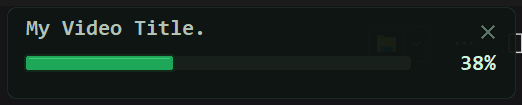
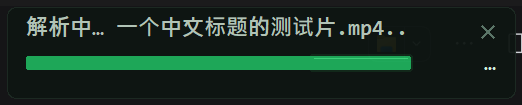
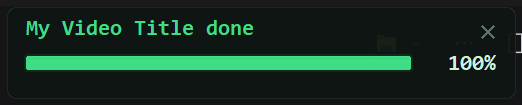
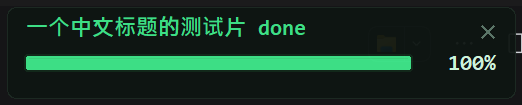
In a terminal it shows a small card: the current file's name on top, a bar and a percentage below. While a file downloads that line animates; the moment the file actually lands it becomes name done. On success it stays 2.3 seconds, on failure 3.2 — and if you closed it, it comes back at the end so you get to see the result.
在终端里它会出现一张小卡片:上面是当前文件的名字,下面是进度条和百分比。下载中那一行在转点,文件真落地的那一刻变成 名字 done。成功停 2.3 秒、失败停 3.2 秒——你把它关掉了,收尾时它还会弹回来让你看见结果。
name done已落地:名字 done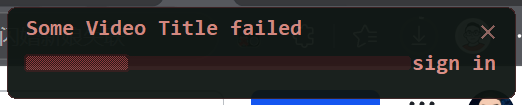
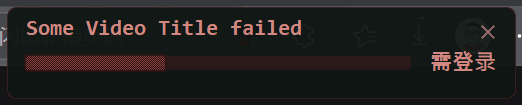
It is a separate process that only reads a small JSON state file, so it can crash or be closed without touching the download. done means the file is on disk (yt-dlp's after_move), not that the progress counter reached 100%.
它是独立进程,只读一个小的 JSON 状态文件,所以它崩了、被关掉都不影响下载。done 的依据是文件真落到磁盘(yt-dlp 的 after_move),不是进度涨到 100%。
Install安装
Portable: unzip, double-click the installer. Python 3.12, yt-dlp and ffmpeg are already inside; all it writes is a few command shims on PATH. From source: any Python 3.10+ with yt-dlp and ffmpeg on PATH, then run install.cmd once.
便携版:解压,双击安装脚本。Python 3.12、yt-dlp、ffmpeg 都在包里,它只往 PATH 写几个命令入口。从源码:Python 3.10+ 且 PATH 上有 yt-dlp 和 ffmpeg,然后跑一次 install.cmd。
$ dl doctor
[i] 出口 IP: 112.226.82.85 (中国大陆)exit IP: 112.226.82.85 (mainland China)
[i] bilibili: 可达reachable   youtube: 超时(需要能出去的线路)timeout (needs a route out)
[i] 结论: B站/抖音可以直接下;YouTube 得先解决线路verdict: Bilibili/Douyin fine as-is; YouTube needs the network fixed first
Download下载
Windows x64. Both archives need to sit next to this page for the buttons to work; hosting them elsewhere just means editing two hrefs.
Windows x64。两个包要和这个页面放在同一层,按钮才是直链;放到别处就改两个 href。
C6E404BB6DD9629874BECD0BA58911F472433D19E5019BCD94303761C69EB263
What doesn't work不好使的地方
- The browser fallback is proven on Douyin and nowhere else. Xiaohongshu and friends: don't count on it rescuing you. 浏览器兜底只在抖音上验证过,别处没有。小红书那类,别指望它自己救回来。
- Bilibili returning 412 means your exit IP is outside mainland China. Not a bug in the tool —
dl doctorsays so out loud. B站返回 412 就是你的出口 IP 在海外。不是工具的毛病,dl doctor会直说。 - The portable build has no
ffprobe, so probing falls back to parsingffmpeg -i. It works. It's ugly. 便携包里没有ffprobe,探测走解析ffmpeg -i的降级路径。能用,就是丑。 transcripton Bilibili dies while the site is throttling you.transcript抓 B站字幕,在风控期间会失败。- Client config formats I couldn't check are listed above with a dash, not a guess. 没核实过的客户端,上表里就是个横杠,不是猜的。
Next, maybe接下来
Not started. Written down so it isn't forgotten — the same list lives in the README. 还没动手,先记着。同一份清单也在 README 里。
dl burn— burn subtitles into the picture.muxonly does soft subs today, so WeChat and CapCut show nothing. Moderate cost: the ffmpegsubtitlesfilter plus the font path trap.dl burn—— 把字幕烧进画面。现在mux只是软字幕,发微信、进剪映看不见字。成本中等:ffmpegsubtitles滤镜加字体路径的坑。dl watch "<url>" --every 6h— follow a channel, download only what's new. Very "downloader", but it brings persistent state and a definition of "new".dl watch "<url>" --every 6h—— 追更,只下新的一集。很"下载器",但会引入常驻状态和"什么算新"的判断。dl history --stats— how many GB have I pulled, which site wins. Pure fun, cheap.dl history --stats—— 我下了多少 GB、哪个站最多。纯好玩,成本低。